

Crash-Consistent Restore Points: Beyond Daily Azure VM Backups
Azure Backup's Standard policy for VMs only runs daily or weekly. Enhanced Policy's crash-consistent restore points fix that, and solve a harder problem: keeping multi-disk snapshots consistent.
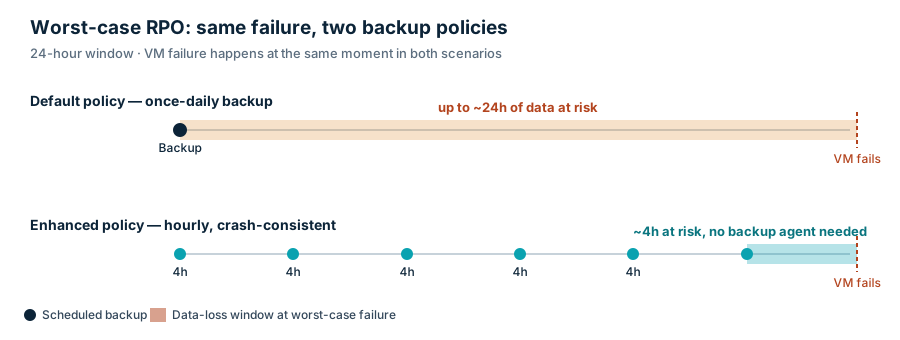
Azure Backup’s Standard policy for VMs supports two schedules: daily or weekly. No hourly option. If your VM goes down 20 hours after last night’s backup, you lose 20 hours of data. This is a limit of the backup service.
You could always work around it yourself. Script your own snapshots with the CLI or PowerShell, run them as often as you want. Nothing stops you.
But do that on a VM with multiple disks and you hit a real problem. Each snapshot call runs separately. Disk A gets captured, then disk B a moment later. If the VM writes data across both disks in that gap, your “backup” is really two disks from two different points in time. For a striped volume, or a database spanning disks, that’s not a backup. That’s a way to corrupt your restore.
Coordinating snapshots across disks so they land at the same instant is the hard part. Doing it yourself means freezing every disk, flushing pending writes, and firing the snapshots together, correctly, every time.
What Enhanced Policy actually gives you
Enhanced Policy does two things. It runs backups as often as every 4 hours instead of once a day. And it takes a crash-consistent, multi-disk snapshot of every disk on the VM as one coordinated set, so you’re not building that coordination yourself.
It’s crash-consistent, not application-consistent. No agent. No VSS or fsfreeze quiescing. The restore looks like the VM lost power: every disk lands at the same moment, but nothing flushed cleanly first. Most modern filesystems and databases recover from that fine on startup. It’s a normal, tested code path, not an edge case.
Which backup type to use
Standard policy, daily or weekly: VMs where losing a day of data doesn’t matter. Dev boxes, anything you can rebuild from IaC in minutes, low-stakes test environments.
Crash-consistent, Enhanced Policy: general VMs, app tiers, most production workloads. Anywhere a coordinated 4-hour-old snapshot beats installing and maintaining a backup agent.
Application-consistent, agent-based: a primary transactional database, where a guaranteed clean shutdown state matters more than the operational cost of running an agent.
Test your restores either way. A policy is a number on paper. A real restore is the only thing that proves it works.
Bottom line
Standard policy caps you at once a day. You could always go faster on your own, but coordinating a multi-disk snapshot yourself is where DIY backup scripts usually go wrong. Enhanced Policy with crash-consistent restore points solves both: real frequency, and coordination you didn’t have to build.
Check your own VMs. If they’re still on Standard policy, that’s worth five minutes today.
Subscribe for more of these.